
On this page
Running a small business means juggling a lot of responsibilities.
You might start your morning responding to customer emails, spend the afternoon managing appointments or employees, and finish the day trying to keep up with marketing, paperwork, and everything else that needs attention.
Artificial intelligence (AI) can help with some of that work.
But where should you begin?
If you've heard that every business needs AI, you're probably also wondering which tools are actually useful, how much they cost, and whether they're worth learning.
The good news is that you don't need to be a technology expert or change the way your entire business operates to get started.
You can begin with one small task.
Maybe it's writing customer follow-up emails. Maybe it's planning social media posts, organizing employee instructions, or preparing answers to common customer questions.
This guide will help you choose that task, find an appropriate AI tool, and build a simple process you can use again.
You'll also learn how to avoid common mistakes, protect sensitive information, and measure whether AI is genuinely saving time.
By the end, you'll have a practical 30-day plan—not just a collection of ideas.
Start Here: Try AI in 15 Minutes
If you've never used an AI assistant before, try this simple exercise.
You don't need to upload documents, connect business software, or provide any private customer information.
Step 1: Open an AI assistant.
You can start with an available version of ChatGPT, Claude, Gemini, or another general-purpose assistant. Review its account and privacy settings before using it for business work.
Step 2: Give it a simple business-related task.
For example:
I own a small landscaping company that offers lawn mowing, mulching, and seasonal cleanups.
Suggest five questions homeowners might ask before hiring us.
Keep the questions practical and easy to understand. Do not make up our prices, policies, or service guarantees.
Step 3: Read the results.
Are the questions relevant? Would your customers actually ask them? Is anything inaccurate or missing?
Step 4: Ask for an improvement.
Try:
These are helpful. Rewrite them as a checklist I can use when updating the FAQ section of my website.
Step 5: Make the final decision yourself.
Keep the useful ideas. Discard anything that doesn't fit your business. Don't publish unverified answers.
That's a basic AI-assisted task.
You supplied the business context, AI suggested and organized ideas, and you decided what was worth using.
You have already learned one of the most valuable principles in this guide:
AI is most useful when it works with your knowledge—not when it tries to replace it.
1. What Is AI, and What Can It Actually Do for a Small Business?
Artificial intelligence is technology that can help software perform tasks such as recognizing patterns, understanding written instructions, creating content, and analyzing information.
For business owners, one of the most approachable forms of AI is a conversational assistant.
You describe what you need in everyday language, and the assistant responds.
For example, you might ask it to:
- Turn rough notes into a professional email.
- Suggest topics for next month's social media posts.
- Organize a list of employee responsibilities.
- Explain an unfamiliar business term.
- Summarize a document you're authorized to share.
- Help you understand a table of non-sensitive business numbers.
The written instruction you give an AI tool is called a prompt.
The series of steps you follow to complete a task is called a workflow.
These are two terms you'll see throughout this guide.
Think of AI as a helper, not an expert who knows your business
Imagine you hire a new office assistant.
The assistant may be good at writing and organizing information, but they don't automatically know your customers, policies, products, or how you prefer to operate.
You would need to provide instructions and review their work.
An AI assistant deserves at least that much care.
It can generate useful ideas quickly, but it may also misunderstand a request or confidently produce an incorrect answer.
| AI can help you... | You still need to... |
|---|---|
| Draft a customer email | Confirm the details and approve the message |
| Organize a checklist | Make sure the steps reflect your actual procedures |
| Suggest marketing ideas | Decide which ideas fit your customers and business |
| Summarize a report | Check the underlying numbers and conclusions |
| Prepare a proposal draft | Verify pricing, scope, and contractual terms |
| Research a topic | Verify important information using reliable sources |
AI isn't a substitute for professional judgment, customer relationships, or industry expertise.
It's another tool you can use to do parts of your work more efficiently.
2. Ten Practical Ways Small Businesses Can Use AI
You don't need to invent an entirely new business process to find a useful application for AI.
Start by looking at activities you already perform regularly.
| Everyday task | How AI can help |
|---|---|
| 1. Customer emails | Create drafts from verified information |
| 2. Social media planning | Suggest content ideas and draft captions |
| 3. Customer FAQs | Rewrite approved answers in clearer language |
| 4. Employee training | Organize existing instructions into checklists |
| 5. Estimates and proposals | Structure approved scope details into readable drafts |
| 6. Meeting notes | Organize notes into decisions and follow-up tasks |
| 7. Business research | Summarize sources and identify questions to investigate |
| 8. Product descriptions | Create descriptions from verified product information |
| 9. Marketing reports | Explain changes in supplied performance data |
| 10. Internal planning | Organize priorities, schedules, and project ideas |
These are starting points, not promises that every task should be automated.
Examples from different industries
HVAC and plumbing companies
A service contractor can use AI to prepare customer follow-up messages from approved job notes.
For instance, an office employee might provide the work completed, whether any follow-up is required, and the company's preferred tone.
AI creates the draft. The employee verifies the service details before sending it.
Cleaning businesses
A cleaning company can use AI to turn an existing new-hire training document into an easy-to-follow checklist.
A manager might ask for separate sections covering arrival procedures, room-by-room responsibilities, equipment handling, and final inspection.
The manager must verify that the checklist reflects company policy and all applicable safety instructions. AI shouldn't invent chemical-use or equipment procedures.
Gyms and fitness studios
A gym owner can ask AI to create a weekly content plan around verified classes, facility updates, and upcoming events.
Rather than posting generic motivational quotes, the owner can focus on helpful topics such as how a class works, what new members should bring, and what to expect at a first session.
The schedule, instructor details, and any health or fitness claims still need review.
Landscaping companies
A landscaping business can organize seasonal marketing ideas around services it actually offers.
For example, AI might help outline educational posts about fall cleanups, spring preparation, or regular property maintenance.
The owner checks recommendations against local conditions, actual availability, and company expertise.
Retail stores
A store owner can use AI to draft product descriptions from verified specifications.
An employee supplies material, size, color, intended use, and other approved details. AI suggests clear customer-friendly wording.
The employee verifies the description and avoids unsupported durability, performance, or origin claims.
Real estate and professional services
A real estate agent, appraiser, or other professional can use AI to organize general educational information or draft non-client-specific website FAQs.
For example, an appraiser might use AI to organize an outline explaining what clients should expect during an appraisal appointment.
However, AI should not independently determine a property's value, produce unsupported professional conclusions, or replace required professional judgment and review.
What these examples have in common
None requires the owner to hand over control of the business.
Each begins with a familiar task, uses AI to prepare or organize something, and leaves the important decisions with a person.
That makes them much better starting points than trying to automate an entire department.
3. How to Choose Your First AI Task
With so many possible uses, the challenge isn't finding something AI can attempt.
It's finding something worth improving.
Here's a simple way to choose.
Look for five characteristics
A good first AI task is usually:
- Frequent: You do it regularly.
- Time-consuming: It takes enough time that improvement would matter.
- Repeatable: The work follows similar steps each time.
- Easy to check: You can tell whether the result is correct.
- Low-risk: You can catch and fix mistakes before they cause problems.
You probably don't want your first AI experiment to involve payroll approvals, sensitive customer records, employment decisions, or automatic financial transactions.
You want something manageable.
Try the five-minute task inventory
Take a piece of paper and write down three to five tasks that regularly consume your time.
For example:
| Task | How often? | Time required | Easy to review? |
|---|---|---|---|
| Draft customer follow-ups | Daily | 10 minutes each | Yes |
| Plan social posts | Weekly | 60 minutes | Yes |
| Prepare service estimates | Several times weekly | Varies | Requires careful review |
| Make payroll decisions | Every pay period | Varies | High-risk task |
This is an illustrative example, not a set of benchmarks.
Start with the task that appears useful and simple to check without exposing sensitive information.
For many owners, that means starting with drafting, organizing, or planning rather than automatic decision-making.
Your first goal is not to automate more. It's to make one task easier without sacrificing quality.
4. Which AI Tools Should a Small Business Use?
A common mistake is signing up for several AI products before deciding what you need them to do.
For most beginners, one general AI assistant is enough to start learning.
General-purpose AI assistants
Tools such as ChatGPT, Claude, Gemini, and Microsoft Copilot can help with many writing, organizing, and information-related tasks.
Capabilities differ across services and subscription plans, so compare the features that matter for your selected workflow.
AI features inside software you already use
Before purchasing a new tool, check the software your business already pays for.
For example, some Google Workspace and Microsoft 365 products offer AI capabilities within their existing productivity environments.
Design platforms such as Canva also offer AI-assisted creative features.
What matters isn't how many AI features a product has. It's whether one of them solves the problem you identified.
Workflow automation tools
Platforms such as Zapier and Make help connect applications and create repeatable processes, including certain AI-assisted workflows.
These can become useful later, but they're not necessary for your first experiment.
Five questions to ask before paying
Before committing to a subscription, ask:
- Which specific business task will this improve?
- Can my team learn to use it without extensive training?
- Does the account offer suitable privacy and access controls?
- Will it work with the software we already use?
- Does the expected benefit justify the total cost, including review time?
Some products offer free or limited-access options, but their terms and available protections vary.
The U.S. Small Business Administration's AI guidance recommends starting small and testing whether a tool adds value before expanding its use.
Our recommendation is similar: Choose a task first. Choose the tool second.
5. How to Write Better AI Prompts
A prompt is simply an instruction.
The better you explain what you need, the easier it is for an AI assistant to produce a useful starting point.
Consider the difference.
Basic prompt:
Write a social media post for my gym.
Improved prompt:
I own a neighborhood fitness studio. We offer beginner-friendly group classes.
Write a short, welcoming social media post explaining what someone can expect at their first class.
Keep it under 100 words, avoid exaggerated fitness claims, and don't invent class times or membership prices.
End with an invitation to contact us for the current schedule.
The second prompt gives the assistant context and clear boundaries.
Use this five-part formula
Task + Context + Constraints + Format + Review Rules
You can remember it by asking five questions:
- What do I want done?
- What does AI need to know?
- What should it avoid or preserve?
- What should the result look like?
- What must be checked or flagged?
You don't need every part for every question. But this structure is especially helpful when you plan to repeat a task.
Five copy-and-customize prompts
Prompt 1: Customer follow-up email
I run a [business type].
Draft a friendly follow-up email after a completed [service or appointment].
Use only these approved details: [non-sensitive description of completed work].
Thank the customer, summarize what was completed, and include the approved next step: [next step].
Keep it under 150 words. Don't invent pricing, warranties, technical findings, or promises.
Ask me if important information is missing.
Prompt 2: Weekly social media ideas
I own a [business type] serving [general area].
We offer [verified services or products].
Suggest five educational social media ideas for the coming week.
Focus on real customer questions and helpful advice rather than hard-selling.
For each idea, provide a headline, a short caption outline, and a suggested photo or video.
Don't invent reviews, customer stories, statistics, or business claims.
Present the ideas in a table.
Prompt 3: Employee checklist
Help me organize our existing [business procedure] into a checklist.
Here are our approved notes: [non-sensitive notes].
Put the steps in a logical order and use language a new employee can understand.
Do not add unverified safety instructions or company policies.
Flag any missing information for a manager to review.
Prompt 4: Customer FAQ improvements
I own a [business type].
Rewrite the following approved customer FAQs to make them clearer and easier to understand: [questions and verified answers].
Keep each answer concise and friendly.
Do not change our policies or invent prices, availability, guarantees, or services.
If an answer is incomplete, flag it instead of guessing.
Prompt 5: Business report summary
Help me understand this non-sensitive business report: [approved data].
Identify the three most important changes and explain them in plain language.
Show any calculations, separate observations from possible explanations, and tell me what information is missing.
Finish with three questions I should investigate before making a business decision.
Don't claim to know the cause of a change unless the data supports it.
Want ready-to-use examples? Explore 15 AI Prompts for Small Business Owners You Can Use Today.
Improve your result with follow-up instructions
Your first response doesn't need to be perfect.
Try asking:
"Make this easier for a customer to understand."
"Which facts did you assume?"
"What information is missing?"
"Give me three alternatives with different levels of formality."
"Turn this into steps my employee can follow."
This back-and-forth is part of using AI effectively.
Treat the first answer as a draft you can improve—not a finished product that must be accepted.
6. Build Your First AI-Assisted Workflow: A Realistic Example
Let's walk through the complete process using a fictional HVAC company called Maple Ridge Heating.
The company wants to send consistent follow-up emails after service appointments without spending as much time writing every message.
This is a good starting project because the task follows a familiar pattern, and the final communication can be reviewed before sending.
Step 1: Record how the task works today
The technician finishes an appointment and completes a service record.
An office employee reads the approved notes, writes a customer email, checks the details, and sends it.
The company records the average time required for the complete task.
Step 2: Prepare approved information
For this example, the service record states:
- Service: Annual heating system maintenance
- Work completed: System inspection and filter replacement
- Finding: System operating normally at the time of the visit
- Follow-up: No additional appointment required
- Email goal: Thank the customer and invite questions
This fictional example doesn't include a customer's name, address, account number, or other identifying details.
Step 3: Give AI a clear instruction
Write a friendly follow-up email for Maple Ridge Heating using only the approved service information below.
Mention the annual maintenance appointment, system inspection, and filter replacement.
The technician reported that the system was operating normally at the time of the visit. No additional appointment is currently required.
Thank the customer and invite them to contact us with questions.
Keep the email under 120 words. Do not invent technical findings or make future performance guarantees.
Step 4: Review the result
A suitable draft might look like this:
Subject: Thank You for Choosing Maple Ridge Heating
Hello,
Thank you for choosing Maple Ridge Heating for your annual heating system maintenance.
During your appointment, our technician completed a system inspection and replaced the filter. The system was operating normally at the time of the visit, and no additional appointment is needed at this time.
We appreciate the opportunity to help maintain your heating system. If you have questions about your recent service, please don't hesitate to reach out.
Thank you again,
The Maple Ridge Heating Team
Step 5: Confirm the details before sending
The employee checks the message against the actual service record and confirms the intended recipient, appointment, work completed, and any follow-up instructions.
If something is missing or inaccurate, the employee corrects it.
Only then is the message approved and sent through the company's normal email system.
Step 6: Save the instructions
Once the process works consistently, the company creates a short written procedure:
- Open the completed service record.
- Use only approved, necessary service details.
- Run the saved AI email prompt.
- Check the message against the record.
- Correct any errors.
- Approve and send the email.
- Record recurring problems so the process can be improved.
That's an AI-assisted workflow: a repeatable series of steps where AI helps with part of the work and a person remains responsible for the result.
Another example: A cleaning company onboarding a new employee
The same method works for internal documentation.
A cleaning business already has an approved list of opening procedures, equipment checks, and end-of-job responsibilities.
The manager uses AI to organize the notes into a simple checklist for new employees.
The manager then checks every step, removes anything AI invented, and confirms the final instructions reflect company practices and safety requirements.
The result is a more readable document built from information the business already trusts.
The workflow is different, but the principle is identical: provide approved context, use AI to prepare the work, review it, and save the process if it helps.
7. Using AI Safely: What Every Business Owner Should Know
Before AI becomes part of your daily routine, establish some boundaries.
You don't need a large corporate compliance department to begin responsibly. But you do need to protect information, verify results, and control what the software is allowed to do.
Know what information you're sharing
Start with three categories.
| Information type | Example | How to approach it |
|---|---|---|
| Public or fictional | Published service descriptions or invented example customers | Often suitable for initial testing, with normal accuracy and rights checks |
| Internal business information | Private procedures, financial reports, internal documents | Use only with approved tools and suitable protections |
| Sensitive information | Customer records, personal identifiers, payment details, passwords, employee records | Don't enter into unapproved AI tools; require appropriate safeguards and authorization |
Removing a person's name doesn't necessarily make their information anonymous. Other details may still identify them.
For beginner experiments, fictional examples and non-sensitive material are the better starting points.
Check the privacy settings of the tool and account
Different products—and different subscription plans within the same product—may handle information differently.
For example, OpenAI says personal ChatGPT accounts have a data-control setting for whether new conversations may be used to improve models; the setting can be turned off. OpenAI also says content from ChatGPT Business, Enterprise, Edu, and Healthcare workspaces is not used to train its models by default. These are model-training settings, not a blanket promise about retention, access, or every connected service. See ChatGPT data controls.
Check the actual terms, permissions, retention settings, and connected applications before using company information.
Verify important details
AI can make mistakes that sound believable.
Always check:
- Customer communication and service details
- Prices, estimates, contracts, and warranties
- Professional or technical recommendations
- Safety instructions
- Statistics and research
- Product specifications and availability
- Claims made in marketing materials
The Federal Trade Commission's advertising guidance says advertising must be truthful and claims must be supported by appropriate evidence.
Using AI to draft an advertisement doesn't remove that responsibility.
Keep people in charge of important actions
As a starting rule, require appropriate human approval before AI-assisted work is sent to a customer, published publicly, used for a consequential decision, or allowed to change records or spend money.
Write a basic AI policy
Even a one-person business benefits from clear rules.
Record:
- Which tools are approved.
- What information may be shared.
- Which information is prohibited or requires authorization.
- Which outputs must be checked.
- Who is responsible when something goes wrong.
The NIST AI Risk Management Framework offers a more comprehensive, voluntary foundation for considering AI risks. Your first internal policy can be much simpler, but the underlying idea is valuable: understand what can go wrong before relying on a system.
8. Your 30-Day Small Business AI Implementation Plan
You now know what AI can do, how to write a prompt, and why reviewing the result matters.
The next step is to make one useful task part of your routine.
Your objective for the next 30 days is to test one AI-assisted workflow—not to automate your entire business.
Download the Free 30-Day AI Starter Worksheet
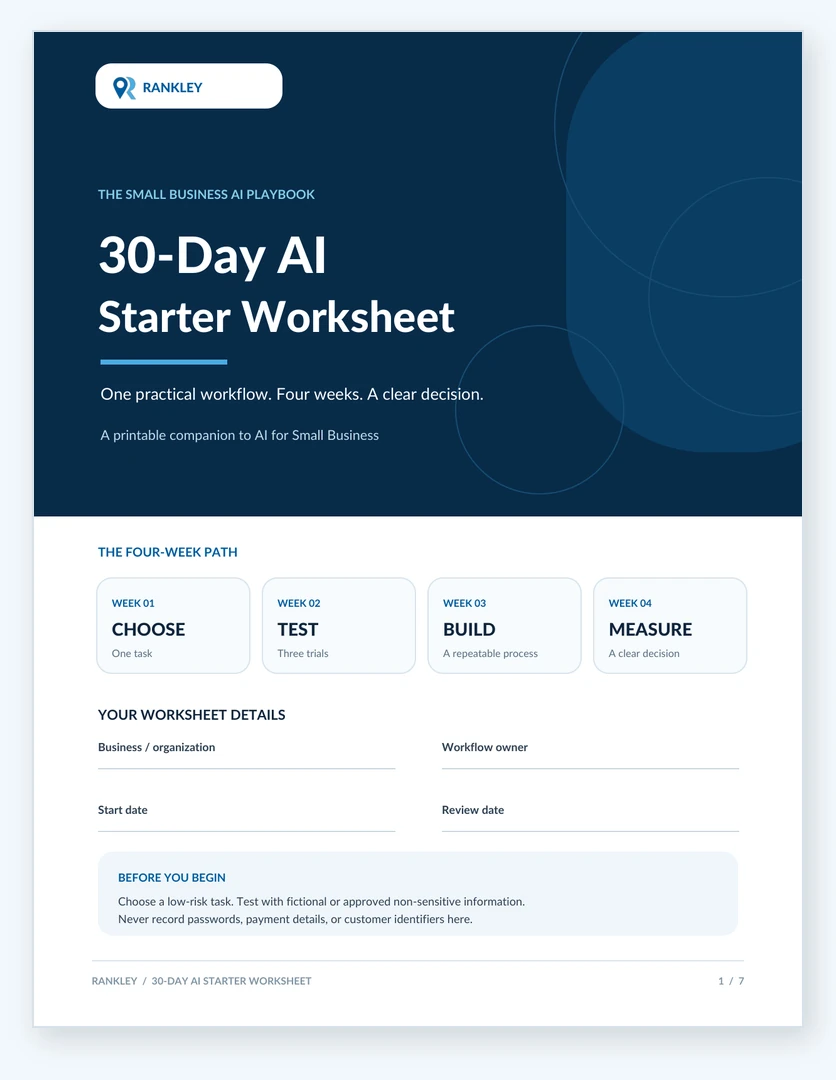
FREE PRINTABLE PDF
30-Day AI Starter Worksheet
Choose your first AI task, test a workflow, track your results, and build a practical 30-day implementation plan.
7 pages · Printable PDF · No signup required
Week 1: Find the right task (Days 1–7)
Goal: Choose one task that is frequent, low-risk, and easy to review.
Days 1–2: Make a task list
Write down three to five recurring activities that take time.
Days 3–4: Choose one opportunity
Compare how often each task occurs, how much time it consumes, whether you can review the result, and the potential consequences of mistakes.
Days 5–6: Record your starting point
Complete the task normally a few times and record how long it takes, including corrections.
Day 7: Define success
Choose one clear goal, such as reducing drafting time while keeping communication accurate and requiring the same approval process.
End-of-week checkpoint: You have a chosen task, a current-process description, and a measurable goal.
Week 2: Test AI (Days 8–14)
Goal: Find out whether AI actually helps.
Days 8–9: Choose an appropriate tool
Review account settings, cost, and information restrictions. Use fictional or properly approved material for testing.
Days 10–11: Write your prompt
Use the five-part prompt formula. Save the instructions so you can repeat the test.
Days 12–13: Run three small tests
Use three different, appropriate examples. Record the full time required, problems found, and corrections needed.
Day 14: Compare the results
Did AI help you produce something useful? Did it save time once review was included? Were the errors manageable?
End-of-week checkpoint: You have a tested prompt, three trial results, and a decision on whether to continue.
Week 3: Make the process repeatable (Days 15–21)
Goal: Create a workflow that another authorized employee—or your future self—could follow.
Days 15–16: Write the steps
Document required inputs, the approved tool, your saved prompt, review rules, and who gives final approval.
Days 17–18: Practice the procedure
Have the intended user follow the instructions. Note anything confusing or missing.
Days 19–20: Run a small supervised pilot
Use the process for a limited number of appropriate tasks. Keep the normal approval process in place.
Day 21: Review feedback
Fix unclear instructions, remove unnecessary steps, and record any recurring errors.
End-of-week checkpoint: You have a written workflow and initial results from using it consistently.
Week 4: Measure the value (Days 22–30)
Goal: Decide whether the workflow deserves to become part of your routine.
Days 22–25: Record real results
Track total time, corrections, output quality, costs, and any relevant customer or employee feedback.
Days 26–27: Compare with your starting point
Look beyond how quickly AI generated an answer. Include preparation, review, and rework.
Day 28: Check safeguards
Confirm the workflow uses approved information, the tool's permissions remain appropriate, and a person still controls important decisions.
Days 29–30: Decide what to do next
- Keep it if the workflow offers consistent benefits and acceptable risk.
- Improve it if the approach is promising but requires changes.
- Stop it if the costs, mistakes, or review effort outweigh the value.
End-of-month result: One tested workflow, a documented process, measured results, and a clear next action.
You don't need to complete these tasks on precisely the listed calendar days. The milestones matter more than the schedule.
9. How to Measure Whether AI Is Helping Your Business
AI doesn't automatically save time just because it generates an answer quickly.
A draft that takes 20 seconds to produce but 15 minutes to correct might not be an improvement.
Measure the complete task.
Track four things
Time: How many minutes does the entire task take, including preparation, review, and revisions?
Quality: Does the finished work meet your usual standard?
Corrections: How often do you need to fix mistakes or redo work?
Cost: What does the tool cost, and what time does your team spend learning and managing it?
Here's a simple example.
A fictional HVAC company prepares 24 follow-up emails per month.
Before using AI, each takes an average of 10 minutes.
With an AI-assisted drafting process, including review and sending, each takes an average of 7 minutes.
That's a 3-minute improvement per email, or 72 minutes across 24 emails in a month.
It's a hypothetical example, not a customer result or a guarantee. The company would still need to compare the difference with software costs, setup time, and any quality concerns.
Use a simple scorecard
| Measure | Before AI | With AI |
|---|---|---|
| Average minutes per task | Record baseline | Record full new time |
| Number of tasks completed | Record volume | Record volume |
| Corrections or errors | Record frequency | Record frequency |
| Quality | Define expected standard | Check against the same standard |
| Monthly cost | Record current cost | Include new software and process costs |
You don't need complicated analytics for your first workflow.
You need enough information to answer:
Is this making the task easier, faster, or more consistent without creating unacceptable risks?
10. What's Next? From Helpful AI Tools to Connected AI Agents
Once you've successfully used AI for individual tasks, you might start wondering whether it could help with more complicated work.
For example, you may already use several tools to understand your business:
- Website analytics
- Google Search Console
- Google Business Profile
- Scheduling or customer management software
- Marketing reports
A general AI assistant doesn't automatically have access to all that information.
You usually need to provide approved information or connect an appropriate system.
What is an AI agent?
An AI agent is a system that can use information and available tools to work through multiple steps toward a goal, subject to the permissions and controls it has been given.
For example, a connected system might review an authorized report, identify questions worth investigating, and prepare recommendations for a business owner.
That is different from simply asking an AI assistant to write a social media caption.
It also creates more responsibility, because systems with permission to take actions need careful limits and supervision.
Where connected marketing information fits
Marketing is one area where connected business information can be useful. For example, Rankley's Website Analytics feature connects Google Analytics data to give owners a clearer view of website performance and what may deserve attention. A connected view can help someone decide what to investigate; it does not mean the product autonomously takes actions on the business's behalf.
The broader lesson isn't that every business needs an AI agent immediately.
It's that AI can become more useful when it has relevant, trustworthy context and clearly defined responsibilities.
Start by learning to use AI well for one task. Explore deeper connections only when you understand the value and the risks.
11. Six Common Mistakes to Avoid
Mistake 1: Buying tools before choosing a problem
Don't subscribe to software simply because everyone is talking about it. Start with a task that needs improvement.
Mistake 2: Assuming AI knows how your business works
Give the tool enough verified context. Don't assume it knows your customers, prices, procedures, or policies.
Mistake 3: Treating the first answer as final
Check facts, edit the language, and ask questions when something seems wrong.
Mistake 4: Using real customer information in unapproved tools
Understand information sensitivity, account settings, and your responsibilities before sharing business records.
Mistake 5: Automating work before testing it
Start with a human-reviewed process. Don't give software permission to make important changes until the workflow and safeguards are appropriate.
Mistake 6: Never checking whether the process works
A tool isn't valuable merely because it uses AI. Measure whether it produces an improvement worth keeping.
Frequently Asked Questions
Do I need technical experience?
You don't need to write code or understand how AI models are built. You do need to learn how to describe tasks clearly, recognize mistakes, and handle information responsibly.
Start with simple writing or organizing tasks that you can review yourself.
Which tool should a beginner use?
Choose an accessible general-purpose assistant or an AI feature already available in your business software. Compare current functionality and privacy settings rather than assuming one product is best for everyone.
Can I use AI for free?
Some AI services offer free or limited-use options. Availability, limits, features, and data policies vary, so review the current terms before using an account for company work.
Can AI write my marketing content?
Yes. AI can help brainstorm ideas and draft content. You still need to make sure the information is accurate, original, appropriate for your audience, and supported wherever you make factual claims.
Can AI respond to customers automatically?
Some systems support automated customer interactions. However, appropriate controls, accurate information, escalation procedures, and compliance obligations are important.
For a first project, drafting responses for human approval is often a better choice than automatic sending.
Is it safe to share customer information?
That depends on the type of information, the tool, the account, the available safeguards, and whether your business is authorized to use the information that way.
Don't put personal or confidential customer information into an unapproved tool. Test with fictional or non-sensitive information whenever possible.
How do I know whether AI is worth paying for?
Compare the total cost of the tool and review process with the time saved, work quality, and other measurable benefits.
If the workflow isn't improving the task, don't assume you need to keep it.
Your Next Step: Choose One Task
AI gives small businesses new ways to get help with everyday work.
You can use it to prepare emails, organize information, plan marketing, develop procedures, and understand reports.
But you don't need to do all those things at once.
Start with one question:
What's one repetitive task in my business that takes more time than it should?
Choose a task you can test safely.
Give an AI tool clear instructions. Review the result. Measure whether the complete process actually improves.
If it helps, turn the process into a routine. If it doesn't, make a change or try something else.
That's how useful AI adoption begins—not with a complicated system, but with one practical improvement.
Start small. Keep people in control. Build on what works.
Further Reading
Official Guidance & Resources
- U.S. Small Business Administration — AI for Small Business
- NIST — AI Risk Management Framework
- OpenAI — Data Controls in ChatGPT
- Federal Trade Commission — Advertising and Marketing Guidance